
On Productivity
The only system that works is your system

You’ve read countless books, seen thousand of resources, and watched hundreds of videos on how to maximize productivity, but none of it seems to click? That’s because there’s only one system that works: your system.
All productivity resources are great, but only if you use them with two goals:
For motivation: yes, knowing that other people can be productive will give you a boost in motivation.
For ideation: there’s no resource in the world that will give you a recipe for being more productive. But extracting ideas from every resource is useful to build your system.
Although you can get many best practices, tips and other ideas from many productivity books and hacks, learning how to combine them is the key. You have to make them fit your lifestyle and your personality.
Personally, I am involved in a lot of projects and initiatives at the same time and people tend to ask me: “how do you make all of these things work out?”.
The truth is, I needed to create a system first. This system is continuously being perfected and tweaked to match my lifestyle and personality. The only “special” thing about how I manage time is that I could find a system that works for me. It makes me very productive (being able to churn out a significant amount of output) and be extremely efficient with my time. This system even allows me to take some time off—gasp—to work on completing my retro game collection, all while juggling countless projects.
Let me walk you through my system, starting with principles:
I need to write most of the things that go through my mind. Smartphones are great to do this. For example - if I remember during the day that I need to speak to a client, I write it. If I remember that I need to buy food for my cat, I write it. This is commonly called “closing the thought loop” and it reduces much of the stress. Most stress about “things to do” doesn’t happen because they exist but because you fear you will forget they exist.
I need to divide what I write into small, medium and large tasks. Some tasks take years, some tasks take months, others take minutes.
I need to have categories. Some tasks are related to DareData, others to NOVA IMS ALUMNI, other for personal projects, etc.
I divide large tasks or projects as needed. But, for me, creating too many subtasks can lead to unnecessary overhead.
I need recurrence.
I want to use the fewest apps possible.
I need automation. I don’t want to think about the tasks for the day and sort them out individually.
The app that best met most of the criteria was Microsoft To-Do. I've automated most of my daily routines using it. An example of my “categories”:
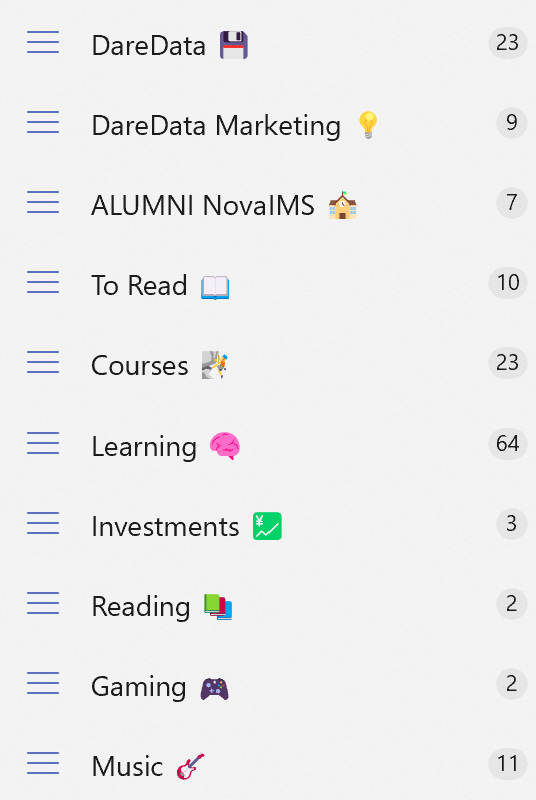
Each of these categories includes several tasks, some of which are one-time, while others are recurring. Let’s zoom in on DareData’s tasks:
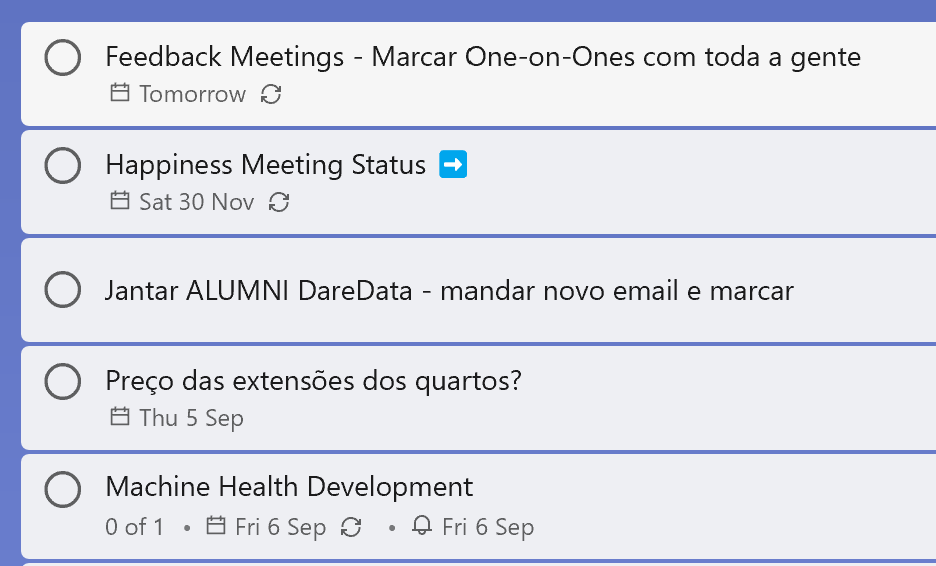
These are some of the tasks that I have attached to DareData. For example:
I need to schedule 1-1s with everyone at DareData for the performance feedback. This is a one shot task for Tomorrow.
I need to check hotel extra date prices by Thursday.
I need to keep working on the "Machine Health" dashboard by Friday. Notice the small recurring icon? That's because I make incremental updates to this dashboard every three days—even if it's just a quick 10-minute improvement.
ALso, notice the ➡️? This is a delegated task. Means that my actionable is to ask the person (or people) I’ve delegated this to. I can check whom I’ve delegated by clicking on the task:
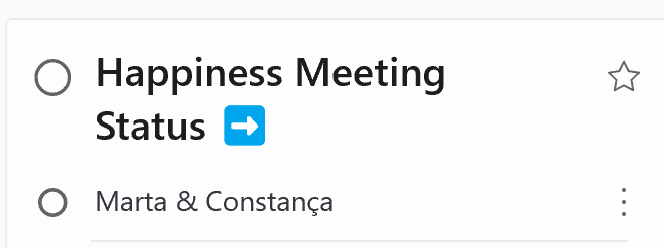
The ultimate goal of all this organization is to open my To-Do app each day and get a clear, comprehensive overview of everything I need/want to accomplish. Now, let’s take a look at what I have lined up for tomorrow.
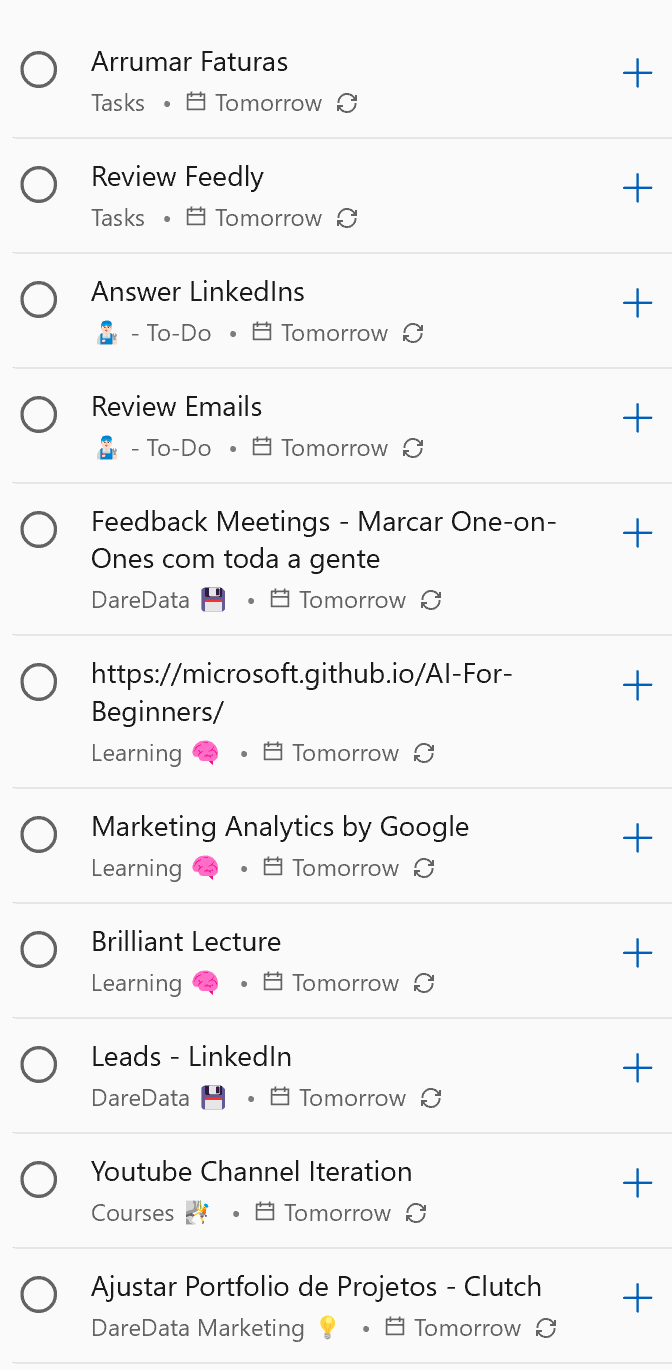
I have several tasks for my day:
Need to sort out my bills and invoices (I have a drawer that I organize every week).
Need to review my Feedly to check the news (sometime during the day).
Need to set up the 1-1s with the team (we’ve seen this in the previous DareData category and it gets automatically drafted here!)
Need to check my email inbox sometime during the day.
Need to check my LinkedIn inbox.
In terms of learning, I have three things I can choose from: Check the AI For Everyone by Microsoft (I’m using some of the materials for my book), doing something on my Brilliant subscription or continuing the Marketing Analytics course I was doing.
There are other strategic DareData tasks that didn’t fit the screenshot.
Some of these tasks are daily (like checking emails and LinkedIn), while others show up weekly or monthly. I try to stick to the tasks listed here and avoid adding too many extras.
And, there are many days where I can’t get through everything, and that’s completely ok. don’t get frustrated because I know these tasks will show up again later.
Again, this is a system that works - for me. What I recommend is that you define your “to-do principles” first and build up from that. Some people only like to have large tasks written, while others like to detail every subtask or detail explicit priorities between tasks (I don’t). Everything is acceptable, as long as it works!
Some resources where I’ve extracted ideas from: